
Managing every visitor entering your premises is the first and most critical step in building a reliable visitor management process. Whether you operate a small office, a growing workplace, or a multi-facility organization, starting with a structured visitor log template helps you create accountability, improve security, and maintain accurate record-keeping. This article is worth reading because it explains, in practical detail, how a simple visitor sign-in sheet can become your foundation for better visitor management, and how you can smoothly upgrade from a manual approach to a digital visitor management system when your needs grow.

What is a Visitor Sign-In Sheet and Why Do Businesses Still Use It?
A visitor sign-in sheet is a basic document used at the front desk or reception to record visitor entry details. It allows staff members to log essential visitor information such as visitor names, purpose of visit, check-in time, and check-out time. For many organizations, this is the first structured step toward visitor management.
Businesses continue using sign-in sheets because they are easy to print, simple to understand, and require no training. A visitor log can be placed on a desk and used immediately, making it suitable for small teams or temporary facilities. Despite its simplicity, it creates a record of every visitor who enters the space.
How Does a Visitor Log Template Help You Track Visitors Effectively?
A visitor log template standardizes how visitor data is captured. Instead of inconsistent handwritten notes, a predefined format ensures that every visit is recorded in the same way. This consistency helps organizations track visitors over time and maintain accurate attendance records.
Using a log template also helps keep track of the number of visitors, identify frequent guests, and review historical visit patterns. For basic security and compliance needs, a visitor log provides a reference point when reviewing who was present in the facility on a specific date.
What Should an Ideal Visitor Log Template Include?
An effective visitor log template should collect only relevant and basic information without overwhelming the visitor. Our free visitor log template includes columns for date, visitor number, visitor name, company, phone, email, host name, purpose of visit, check-in time, check-out time, and notes.
This format allows organizations to record information consistently while remaining flexible. You can add a column for meeting rooms, desk number, or employee host details if needed. If phone or email collection is not required, you can easily edit or remove those fields.
See How Aldahra Replaced Logbooks With Entry2Exit
How to Use a Free Visitor Log Template Step by Step in an Office
How to Use This Visitor Log Sheet (Quick Guide)
- Create your own copy of this template by going to File -> Make a copy.
- Bookmark the copy.
- Add or delete columns to customize according to your wish.
- Enter the Date of the visit.
- Assign the next Visitor Number in sequence.
- Fill in the Visitor Name and Company.
- Add the visitor’s Phone and Email (optional).
- Enter the Host Name and Purpose of Visit.
- Record the Check-in Time when the visitor arrives.
- Record the Check-out Time when the visitor leaves.
- Use Notes for any remarks or special instructions.
Start by placing the visitor sign-in sheet template at the reception or front desk. Every visitor entering the office fills in their details upon arrival. The receptionist or security personnel ensures the information is complete and legible.
Next, during exit, the visitor updates the check-out time. This simple process helps track visitors accurately and ensures that every visitor is accounted for within the workplace. The same template can be printed or used digitally via excel, google sheets, or microsoft tools.
Can You Customize a Visitor Sign-In Sheet Template for Your Workplace?
Yes, customization is one of the biggest advantages of using a template. You can create custom fields based on your operational needs. Some organizations add columns for reason for visit, contact information, or visitor sign.
Our free download is provided in a format that allows you to customize easily. You can adjust column names, edit layouts, or even convert the file into a pdf for offline usage. This flexibility makes the template suitable for different industries and office sizes.
Try our Gate pass form template
What Are the Benefits of Using Sign-In Sheet Templates for Visitor Management?
Sign-in sheet templates offer a low-cost and fast way to start visitor management. They help ensure accountability, improve basic security, and support manual attendance tracking. For organizations starting from scratch, this is a practical solution.
They also provide visibility into visitor flow, help manage meeting schedules, and support internal audits. For businesses with limited visitor volume, a free visitor log template can meet short-term needs effectively.
Visitor Register Format: What Should It Include?
A visitor register is used to record the details of people entering and leaving a facility. The format is usually the same for most offices, factories, and other commercial buildings.
A standard visitor register format includes:
- Visitor Name: Name of the person visiting.
- Company: Company the visitor is coming from.
- Contact Number: Phone number of the visitor.
- Person to Meet: Name of the employee or host.
- Purpose of Visit: Reason for visiting.
- Date and Time: Check-in and check-out times.
- Signature: Visitor’s signature, if required.
Here is a simple example of a visitor register:
| Visitor Name | Company | Person to Meet | Check-in | Check-out |
|---|---|---|---|---|
| John Smith | ABC Ltd | David | 9:30 AM | 10:15 AM |
| Sarah Jones | XYZ LLC | Michael | 11:00 AM | 12:30 PM |
Visitor Log Book vs. Visitor Sign-In Sheet
A visitor log book and a visitor sign-in sheet serve the same purpose, which is to keep a record of visitors entering and leaving a facility.
A visitor log book is usually a physical book kept at the reception or security desk. Visitors enter their details on a new line each time they visit. This is commonly used in offices, factories, and residential buildings where visitors arrive regularly.
A visitor sign-in sheet is a single sheet of paper with fields for visitor details. These are often used for events, meetings, or places where visitor records are maintained on a daily basis.
Both can be maintained manually or replaced with a digital visitor management system.
Visitor Log Template in Excel, Word and PDF
Visitor log templates are available in different formats depending on how you want to maintain the records.
- Excel: Suitable for maintaining visitor records digitally. You can add entries, search for visitors, and filter records by date.
- Word: Useful for creating a visitor sign-in sheet that can be edited and printed.
- PDF: Suitable for printing blank visitor log sheets and keeping them at the reception.
We have provided a free visitor log template in Google Sheets that you can copy and use in Excel. You can also print the sheet or save it as a PDF if you prefer maintaining physical records.
What Is a Digital Visitor Log Book?
A digital visitor log book is the electronic version of a traditional visitor register. Instead of writing visitor details in a physical book, the details are entered through a tablet, kiosk, or computer at the reception.
Once a visitor checks in, their details, including name, contact information, person they are visiting, and entry time, are stored in the system. The check-out time can also be recorded when they leave.
The reception or security team can search previous visitor records, check who is currently inside the building, and download reports whenever required.
A digital visitor log book is usually part of a visitor management system, which can also handle visitor registration, approvals, QR code passes, and notifications to the host.
Manual Visitor Log Template vs Visitor Management System
| Feature | Manual Visitor Log Template | Visitor Management System |
|---|---|---|
| Data entry | Manual handwriting or typing | Automated digital entry |
| Real-time tracking | Not available | Available |
| Security | Low, open access | Secure and controlled |
| Host notification | Not available | Instant notifications |
| Compliance | Difficult to maintain | Built-in compliance |
| Efficiency | Low | High |
| Visitor data storage | Paper files or scattered sheets | Centralized digital database |
| Audit trail | Not available | Fully traceable |
| Scalability | Limited | Highly scalable |
Disadvantages of Using a Manual Visitor Log Template
While a visitor log template is a good first step, it introduces several operational, security, and scalability challenges as visitor volume increases. Below are the major disadvantages broken down in detail.
Lack of Real-Time Visibility and Tracking
A manual visitor log does not provide real-time insights into who is currently inside the office or workplace.
- No live view of every visitor inside the facility
- Difficult to track visitors during emergencies or evacuations
- No way to instantly know the number of visitors present
- Inability to monitor entry and exit patterns in real time
- Manual review required to keep track of ongoing visits
This limitation becomes critical in workplaces with frequent meetings, shared spaces, or high visitor movement.
High Risk of Human Error and Inaccurate Data
Manual data entry increases the chances of incorrect or incomplete visitor information.
- Visitor names may be misspelled or illegible
- Incorrect check-in or check-out times recorded
- Missing contact information or purpose of visit
- Visitors may skip fields on paper sheets
- Errors go unnoticed without validation
Over time, inaccurate visitor data reduces the reliability of your visitor log and affects record-keeping.
Security and Privacy Concerns
Paper-based visitor sign-in sheets expose sensitive visitor information to unauthorized individuals.
- Visitor information visible to other guests
- No access control over who can view or edit the log
- Risk of theft, loss, or tampering of paper sheets
- No secure storage for visitor data
- Difficult to meet basic security expectations
This creates compliance risks, especially in offices handling confidential data or client visits.
No Host Notification or Communication
A manual visitor log does not support automated communication.
- Employees are not notified when their guest arrives
- Reception staff must manually call or message hosts
- Delays in meetings due to communication gaps
- No confirmation that the visitor has checked out
- Inefficient front desk process
This directly impacts visitor experience and internal efficiency.
Time-Consuming and Inefficient Process
Managing visitors manually becomes increasingly time-consuming as volume grows.
- Slow sign-in process during peak hours
- Reception staff spends time guiding visitors
- Manual sorting and filing of logs
- Searching historical records is inefficient
- Manual attendance tracking requires extra effort
This reduces overall workplace efficiency and increases administrative burden.
No Audit Trail or Accountability
Manual visitor logs do not provide transparency or traceability.
- No record of who edited or accessed the log
- Impossible to verify changes made to entries
- No history of corrections or deletions
- Difficult to support audits or investigations
- Weak compliance posture
This is a serious drawback for regulated industries and corporate facilities.
No Integration with Other Systems
A visitor log template works in isolation and cannot connect with other tools.
- No integration with access control systems
- Cannot link with management software
- No connection to calendars or meeting schedules
- Visitor data remains siloed
- No automation possibilities
As a result, visitor management remains a disconnected manual process.
Poor Scalability for Growing Businesses
Manual systems do not scale with business growth.
- More visitors mean more paper sheets
- Storage space increases over time
- Difficult to manage multiple office locations
- Inconsistent formats across facilities
- Higher chances of operational breakdown
What works for a small office quickly becomes unmanageable for larger teams.
No Advanced Features or Automation
Manual visitor logs lack all advanced visitor management capabilities.
- No qr code based entry
- No tablet or kiosk sign-in
- No digital visitor experience
- No automated reports or analytics
- No efficiency optimization
This creates a clear gap between basic visitor tracking and modern visitor management expectations.
How Does a Digital Visitor Management System Solve These Problems?
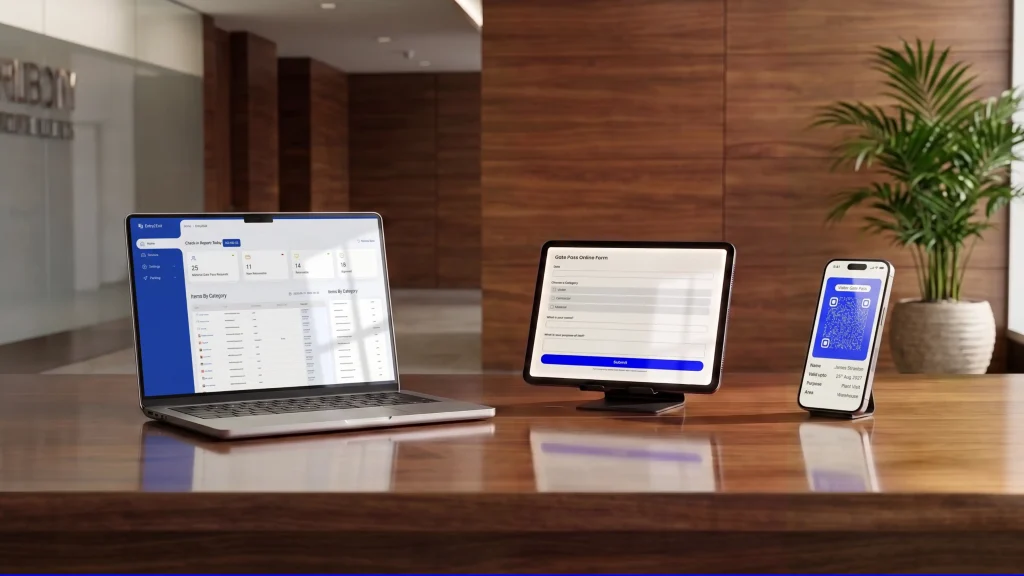
A digital visitor management system replaces paper sheets with a secure sign-in system using tablets, qr code check-in, or kiosks. It automatically captures visitor information, sends instant notification to hosts, and maintains a secure digital visitor record.
Advanced features such as real-time tracking, audit trails, and centralized visitor data management significantly improve efficiency. Digital visitor management software also integrates with management software, access control systems, and remote dashboards to provide full visibility.
When Should You Upgrade to Visitor Management Software?
You should consider an upgrade when visitor volume increases, compliance requirements become stricter, or security risks rise. If managing visitors manually starts affecting efficiency, it is time to move forward.
A digital visitor management solution ensures accurate entry records, improves security, and reduces operational workload. It transforms visitor management from a manual process into an efficient, scalable platform.
What Is the Best Visitor Management Solution for Modern Offices?
The best visitor management solution combines ease of use, customization, and security. Entry2Exit offers a digital visitor management system designed to replace manual logs while maintaining flexibility.
It supports digital visitor sign-in, real-time tracking, automated notifications, and secure data storage. This makes it suitable for offices, workplaces, and multi-location facilities looking to upgrade their visitor management process.
Frequently Asked Questions
1. What is a visitor log template?
A visitor log template is a structured format used to record visitor information during a visit.
2. Is a free visitor log template suitable for small offices?
Yes, it is suitable for offices with low visitor volume.
3. Can I use the template in google sheets?
Yes, the template supports google sheets usage.
4. Can I print the visitor sign-in sheet?
Yes, the template can be printed or used offline.
5. Is visitor data secure in manual logs?
Manual logs are less secure compared to digital systems.
6. Can I customize the template fields?
Yes, you can customize columns based on your needs.
7. What is the purpose of visit field used for?
It helps understand why the visitor entered the facility.
8. When should I move to digital visitor management?
When manual tracking becomes inefficient or risky.
9. Does Entry2Exit offer a digital visitor solution?
Yes, Entry2Exit provides a complete visitor management platform.