Free parking for customers is one of the simplest ways to make a site easier to visit. The challenge is giving it away without losing control of the car park. That is what parking validation solves.
In this guide, we explain how parking validation works in an automated car park, how to set up free parking for customers alongside paid parking and staff parking, and what to check before you choose a system. We use a real setup we delivered for a warehouse complex for this demo, along with the questions facility owners ask us most.
What Is Parking Validation?
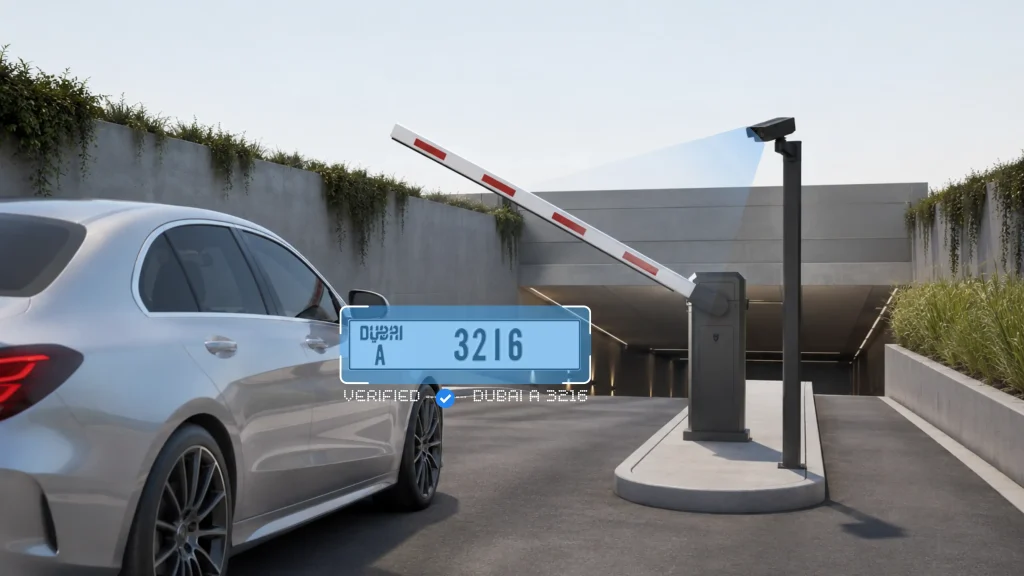
Parking validation is how a car park decides which vehicles park for free and which vehicles pay. In older car parks, this meant stamping a paper ticket. In an automated car park, the vehicle’s number plate does the job. The system identifies the vehicle at the entry, checks which parking type it belongs to, and applies the right rule at the exit.
The parking management system use ANPR (Automatic number plate recognition) method for detecting the number plates, which is then used by the software layer to grand or restrict access.
Entry2Exit uses ANPR based detection because of its versatility, accuracy and the adaptability to any environment.
So when a business wants to offer free parking for customers, it does not need a staff member checking tickets at the gate. The rules are set once in the dashboard, and the system applies them to every vehicle.
How an Automated Parking System Handles Free Parking for Customers
Let us take a real example from Entry2Exit. For a warehouse complex, we provided an automated parking system. We have an ANPR camera at the entry and a gate barrier setup. We also have payment kiosks and QR codes set up in the parking lot, where customers can pay using a QR code or pay at the exit on the payment kiosk.
Here is how it works in practice:
- The vehicle arrives. The ANPR camera at the entry reads the number plate and the gate barrier opens.
- The system knows who the vehicle is. Based on the parking type, the vehicle is treated as a paid customer, a staff registered vehicle, or a free visitor.
- The vehicle leaves. Free visitors exit without paying. Paid customers pay through the QR code or at the payment kiosk, and the barrier opens.
The same setup handles paid parking and free parking for customers at the same site. You do not need two separate systems.
Setting Up Parking Types: Paid Customers, Staff and Free Visitors
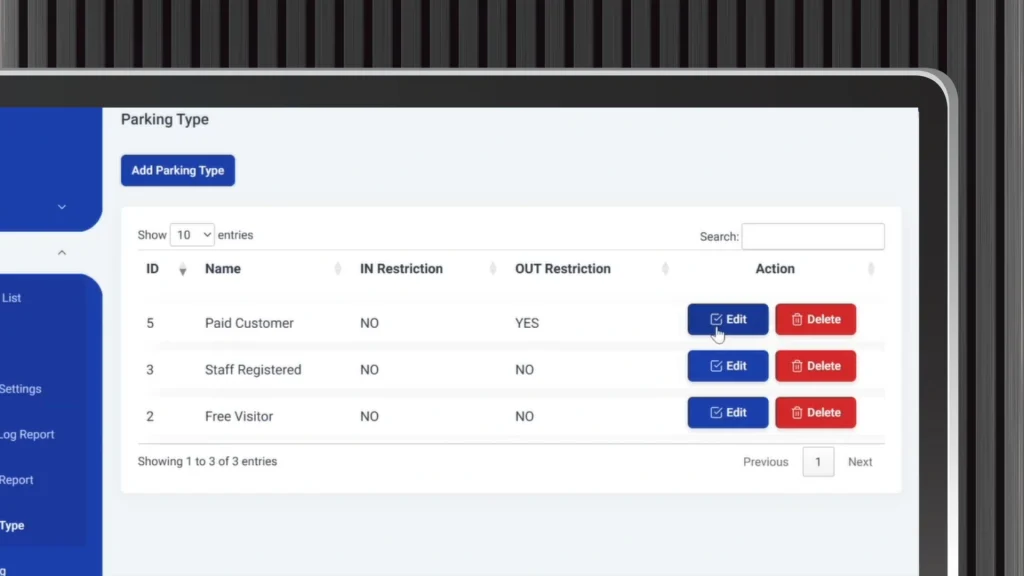
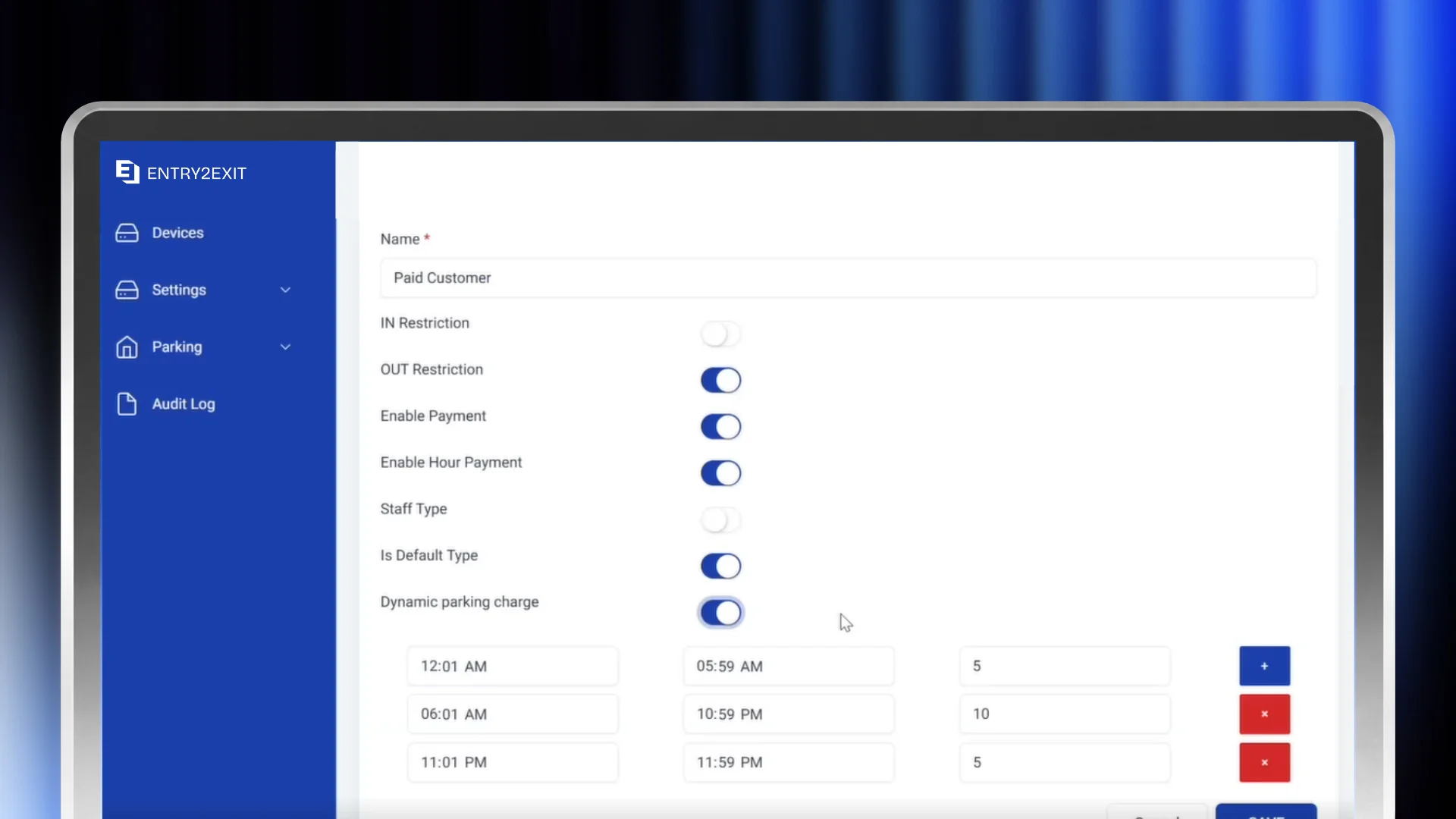
This is the core of parking validation. In the parking settings, we can set up the different parking types. It can be paid customers, it can be staff registered vehicles that are coming in, and it can be free visitors.
Paid customers. For paid customers, we enable payment and set up the amount in the dashboard.
Staff registered vehicles. Staff vehicles are registered in the system, so they come in and go out without paying every day.
Free visitors. This is the setting you use when you want to offer free parking for customers. These vehicles are allowed in and out without payment.
All of these settings can be set from your dashboard. You have the flexibility to do so, and you can change them whenever your parking policy changes. For example, you can keep the car park free for customers on weekdays and switch to paid parking during busy periods.
Monthly Pricing and Duration Settings
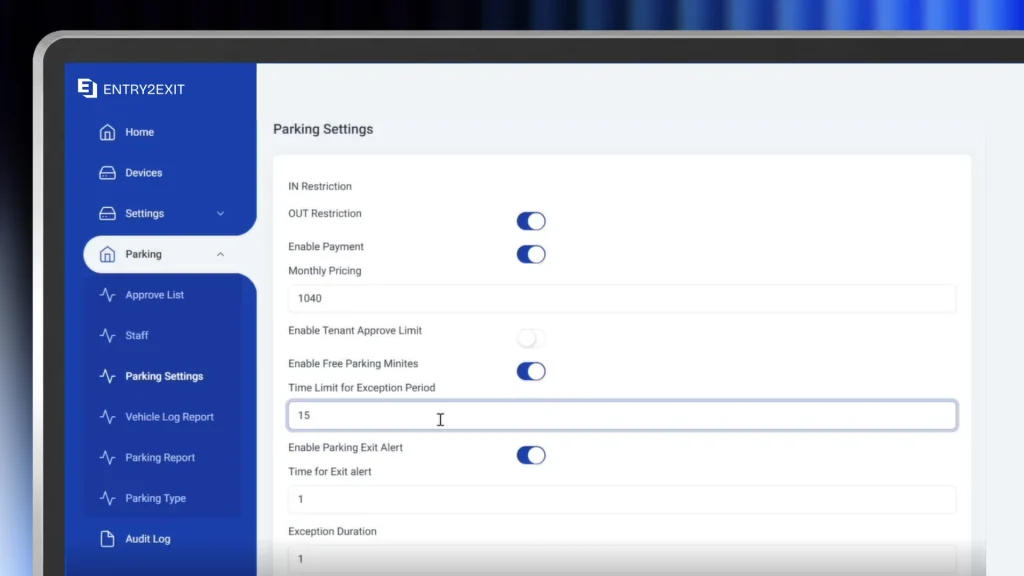
Free parking for customers does not have to mean unlimited parking. In the parking settings, we can set up monthly pricing, and we can also set up the duration.
Monthly pricing works well for regular users such as tenants and businesses inside the complex. Duration settings help you control how long a vehicle can stay before charges apply. This way, you can offer free parking for customers who are genuinely visiting, without the spaces being taken all day by vehicles that are not.
For example, you have multiple retail outlets, restaurants and offices inside your business complex and all of them share the same parking lot. To make it fair for everyone, you can give certain number of free parking hours for each tenant which can be used by their staff, customers who have purchased with them or to their guests and so on.
Once the limit is reached, they can purchase additional hours with you, making this a win-win for both parties and the customers.
The Free Exit Period After Payment
One question we get often is: how long does a customer have to leave after paying?
In the dashboard, we can set up the exception period, which is the time after payment. This amount of time is set for free. So let us say I pay through the QR code. Within 15 minutes, I should exit the premises.
This free period matters for customer experience. A customer who pays and then walks back to the car, loads shopping or waits in a queue at the exit should not be charged again. You decide the length of this period from the dashboard.
Normally retail centres prefer first 15 minutes to be free while other businesses usually gives first hour to be free. This definition is completely configurable by the admin without our assistance.
Payment Options for Customers Who Pay
Not every vehicle parks for free, so payment needs to be easy. In our setup, customers can pay at the exit on the payment kiosk via tap. It can be Apple Pay, Google Pay, or they can pay through cash as well. They can also pay using the QR codes placed in the facility.
Offering more than one payment option keeps the exit moving. Customers who prefer to pay with their phone can tap, and customers who prefer cash are still covered.
Entry2Exit is built with open-integration framework, which enables us to be integrated with any 3rd party software, hardware, or payment gateways as required. This will be a great benefit for the facility, if they are already working with a preferred payment gateway or bank.
Handheld Devices and Printed Receipts for Security
We also give a small handheld device to the security team, which prints out the receipt. We can edit the details on the receipt from the dashboard, according to what the site needs. Usually we suggest them to be Sunmi branded devices, since we have direct support lines in Sunmi and they are available in almost any part of the world.
This is useful when a customer asks for a receipt, or when the security team needs to handle a vehicle at the gate manually.
What You See on the Parking Dashboard
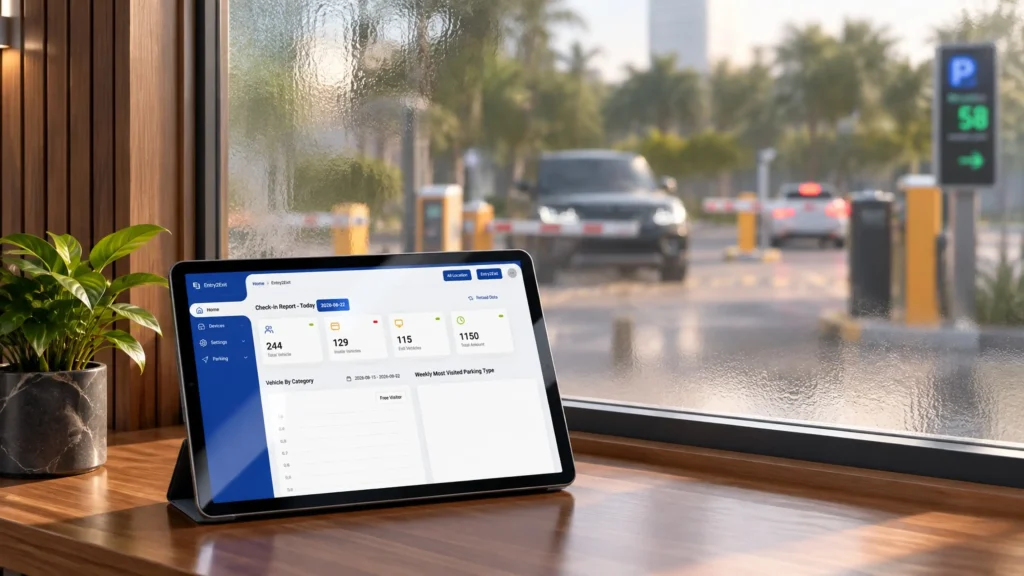
When you log in to the dashboard as an admin, this is what you will see:
- The total number of vehicles that have come in today
- The total number of vehicles currently inside
- The total number of vehicles that have exited today
- The total revenue generated for today
You can also generate reports based on different categories from the home dashboard. This is how you check whether your free parking for customers is working. You can see how many vehicles are parking for free, how many are paying, and how much revenue the car park is making each day.
This part is fully customizable to the facility requirements and the type of parking management system.
What Happens If a Printer or Device Stops Working?
This is a question a client asked us directly: in case the printers are stuck, how do we depend on the system at the same time?
Regarding the products we use, we use branded products who have great track records. We do not source products just for budgetary reasons from low quality vendors. We go with brands such as Sunmi. Sunmi dominates the market right now with POS devices, and you will see them across the world. We deal directly with Sunmi, and they provide us support. If any issue goes wrong, they take responsibility. They either try to fix it on site or they replace the device. For the kiosks, we also use branded products.
Warranty, AMC and Support
We have product warranties in place. For our software, we provide an AMC. If any support issues come up, we have a 24/7 support team that will respond within 24 to 48 hours maximum, and we are able to resolve most issues.
Most of the assistance can be provided via a remote connection. If an issue cannot be resolved remotely, we can send a team on site.
Frequently Asked Questions
What is parking validation?
Parking validation is the process a car park uses to decide whether a vehicle parks for free or pays. In an automated car park, the ANPR camera reads the number plate and the system applies the rule for that vehicle’s parking type.
How do I offer free parking for customers?
Set up a free visitor parking type in your parking dashboard. Vehicles in that category can enter and exit without paying, while paid customers and staff vehicles follow their own rules.
Can I have free parking and paid parking in the same car park?
Yes. Paid customers, staff registered vehicles and free visitors can all be set up in the same system, and you can change the settings from the dashboard at any time.
How long do customers have to exit after paying?
You set this as the free exit period in the dashboard. For example, if a customer pays through the QR code, you can give them 15 minutes to exit the premises.
How can customers pay for parking?
Customers can pay using QR codes in the facility, or at the exit on the payment kiosk by tap with Apple Pay or Google Pay, or with cash. We have active integrations with most popular payment gateway’s out there. We can also do fresh integrations as required.
What happens if a device fails?
We use branded hardware such as Sunmi, with warranties in place. Sunmi either fixes the device on site or replaces it, and our 24/7 support team responds within 24 to 48 hours.
Offer Free Parking for Customers Without Losing Control
Parking validation lets you give free parking for customers, charge the vehicles that should pay, and keep staff parking separate, all from one dashboard. With ANPR at the entry, gate barriers, payment kiosks, QR codes and a handheld receipt device for security, the whole car park runs on the rules you set.
If you would like to see how this works for your site, reach out to our team. We will be more than happy to help you find the right solution.