Managing queues are super important in customer facing environments. It not only improves customer experience but also provides competitive edge and positive brand positioning. People are more likely to choose businesses where they don’t have to wait standing in lines for hours if a strong enough competitor exists where they can wait virtually and get notified when it’s their turn.
Why Whatsapp?
Whatsapp is used by over 3 billion+ monthly active users globally. It is the largest messaging service in the world and it is free. This makes whatsapp the go to option for customer interaction.
Using WhatsApp for queue management is super seamless on the customer side. You generate a token physically or online through a qr code. You submit your WhatsApp number. You get notified when it’s your turn on the line.
This simple process combined with the userbase of whatsapp makes it the best choice for queue notifications.
How to use Whatsapp for queue notifications?
For this, you need a queue management system with whatsapp integration like Entry2Exit. Entry2Exit is the leading queue management system that has built in WhatsApp integration. You can integrate your own WhatsApp number as a sender account or you can choose a number we provide. It’s super easy to setup.
Some of the features we are proud about Entry2Exit queue management system are;
- Queue token generation (QR code, Kiosk, or Tablet)
- Automated notifications via SMS, Email, WhatsApp
- Online appointment booking
- Dashboard with analytics
- Virtual queuing
- Real-time queue status display
- Occupancy limiter
- Centralized dashboard
- Customer feedback collection
- Identify bottlenecks
- Priority calling
- Custom queue categories
- Advertisement display on digital signage
WhatsApp Queue Notification Templates
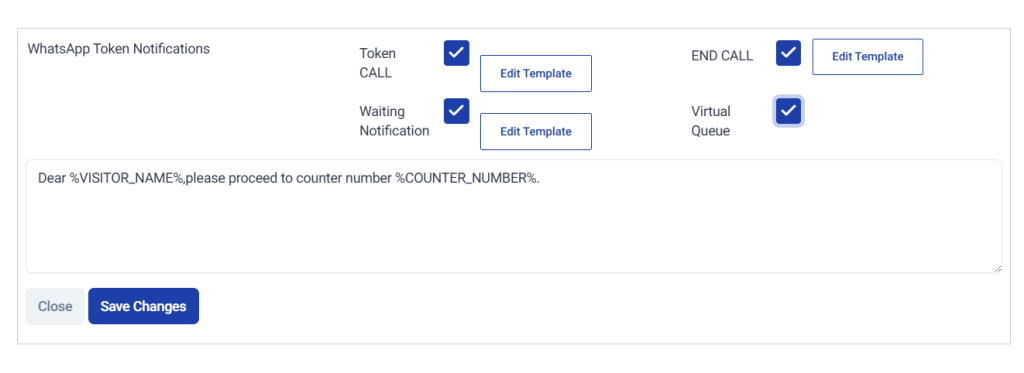
The whatsapp queue notifications are completely customisable. Each data point you collect during the queue token generation can be used as variables in the message.
These are some templates you can use;
Token Call NOTIFICATION
1. Standard Counter Call
Dear %VISITOR_NAME%, your token %TOKEN_NUMBER% is now being served at Counter %COUNTER_NUMBER%. Please proceed immediately.
2. Final Call Notice
Dear %VISITOR_NAME%, this is a call for token %TOKEN_NUMBER% at Counter %COUNTER_NUMBER%. If you are nearby, please approach the counter now.
3. Area-Based Call
Dear %VISITOR_NAME%, token %TOKEN_NUMBER% has been called. Kindly proceed to Counter %COUNTER_NUMBER% in %QUEUE_NAME% section.
Waiting Notification
1. Queue Confirmation
Dear %VISITOR_NAME%, your token %TOKEN_NUMBER% has been successfully registered. Estimated waiting time is %ESTIMATED_TIME% minutes.
2. Still in Queue Update
Dear %VISITOR_NAME%, token %TOKEN_NUMBER% is still in queue. We will notify you once your turn is approaching.
3. Delay Update
Dear %VISITOR_NAME%, there is a slight delay in the queue. Token %TOKEN_NUMBER% is expected to be called in approximately %ESTIMATED_TIME% minutes.
End Call (After Service Completion)
1. Service Completed
Dear %VISITOR_NAME%, your request under token %TOKEN_NUMBER% has been successfully completed. Thank you for visiting us.
2. Transaction Closed
Dear %VISITOR_NAME%, token %TOKEN_NUMBER% has been closed. If you require additional assistance, please collect a new token.
3. Feedback Request
Dear %VISITOR_NAME%, your service for token %TOKEN_NUMBER% is complete. We value your feedback. Please share your experience if requested at the branch.
Virtual Queue
1. Virtual Queue Entry Confirmation
Dear %VISITOR_NAME%, you have joined the virtual queue. Your token number is %TOKEN_NUMBER%. Estimated waiting time is %ESTIMATED_TIME% minutes.
2. Remote Waiting Confirmation
Dear %VISITOR_NAME%, token %TOKEN_NUMBER% is active in the virtual queue. You may wait remotely and will be notified before your turn.
3. Approaching Turn Alert
Dear %VISITOR_NAME%, token %TOKEN_NUMBER% will be called shortly. Please ensure you arrive at %BRANCH_NAME% within %ESTIMATED_TIME% minutes.
Download our Queue Management System Brochure
WhatsApp vs Email vs SMS for Queue Notifications
| Metric | SMS | ||
|---|---|---|---|
| Delivery Speed | Instant (internet-based) | Instant (carrier-based) | Depends on server & inbox load |
| Open Rate | Very High (80–98%) | High (85–95%) | Moderate to Low (15–35%) |
| Read Speed | Usually within minutes | Usually within minutes | Can be hours or ignored |
| Cost Per Message | Medium (template/session based pricing) | Low to Medium (per SMS charge) | Very Low (bulk email cost negligible) |
| Setup Complexity | Medium (Business API/Inhouse E2E API required) | Low (SMS gateway integration) | Low (SMTP or email service provider) |
| Template Approval Required | Yes (for business-initiated messages), No (for notifications) | No | No |
| Internet Required by User | Yes | No | Yes |
| Rich Media Support | Yes (buttons, links, PDFs, maps) | No (text only, limited length) | Yes (attachments, HTML design) |
| Two-Way Communication | Yes (interactive replies) | Limited (depends on gateway) | Yes (but slow interaction) |
| Delivery Reliability | High (if number is active on WhatsApp) | Very High (direct to mobile network) | Medium (spam filters affect delivery) |
| Spam Filtering Risk | Low (approved templates) | Low | High |
| Best For Real-Time Token Call | Excellent | Good | Poor |
| Best For Waiting Updates | Excellent | Good | Poor |
| Best For End-of-Service Feedback | Excellent | Moderate | Good |
| Best For Virtual Queue | Excellent | Moderate | Poor |
| Message Length Limit | Moderate (template-based limits) | 160 characters per SMS (standard) | Practically unlimited |
| Branding Capability | Medium (business profile branding) | Very Low | High (logo, design, signature) |
| Analytics & Tracking | Good (delivery & read receipts) | Basic (delivery reports) | Advanced (opens, clicks, bounce rate) |
| Global User Base | 3+ billion active users | Universal mobile phone users | 4+ billion email accounts (varies in activity) |
| User Preference for Alerts | High (daily-use app) | High (default phone function) | Low for urgent alerts |
| Suitability for Government Offices | High | High | Moderate |
| Suitability for Banks | High | High | High |
| Suitability for Hospitals | High | High | Moderate |
| Implementation Time | Fast | Fast | Fast |
The 3 most popular choices for sending queue notifications are whatsapp, sms and email. The choice is often influenced by regional preferences. Asian countries are more interested in whatsapp notifications while europe prefers emails. Sms is preferred by all over the world. From our experience, using WhatsApp + SMS redundancy ensures maximum reach while maintaining real-time operational efficiency.
FAQ: WhatsApp Queue Notifications
1. Do customers need to save our number to receive WhatsApp notifications?
No. Customers do not need to save your number. As long as they have an active WhatsApp account and have provided a valid mobile number, they can receive approved business notifications.
2. What happens if the customer does not have WhatsApp?
If the mobile number is not registered on WhatsApp, the message will fail. In such cases, it is recommended to configure SMS as a fallback channel to ensure notification delivery.
3. Are WhatsApp queue messages sent instantly?
Yes. Once triggered by the queue system (token call, waiting update, etc.), messages are delivered in real time, typically within seconds, depending on internet connectivity.
4. Can customers reply to queue notifications?
Yes. WhatsApp supports two-way communication. Customers can reply with questions, request assistance, or interact with automated chat flows if configured.
5. Is template approval required for queue notifications?
No, E2E WhatsApp API uses a non business messaging model which doesn’t need template approvals.
6. Is WhatsApp secure for sending queue information?
Yes. WhatsApp messages are end-to-end encrypted. However, sensitive personal or financial data should still be handled carefully according to local data protection regulations.
7. Can estimated waiting time be updated automatically?
Yes. If integrated with Entry2Exit Queue Management System, waiting times and queue positions can be calculated dynamically and included in automated notifications.
8. What if the customer misses their token call?
The system can be configured to send a missed-call notification or automatically mark the token as no-show after a defined time threshold. The customer may then need to request a new token.
9. Is WhatsApp suitable for high-volume environments like banks or government offices?
Yes. WhatsApp Business API supports high message volumes when properly configured through an official provider. It is widely used for banks, hospitals, service centers, and government institutions for real-time alerts.